

What is a personal AI assistant?
A personal AI assistant is an AI-powered helper with a continuing role and context about your work. It helps organize information, draft text, turn a vague idea into a plan and define the next action. What makes it personal is the context: who it supports, which constraints matter and how you prefer to receive an answer. The useful starting point is a recurring responsibility you can describe clearly.
For example, “write a reply to my client” leaves important questions unanswered. With suitable saved context, an assistant can take into account that you are a designer, use a professional tone, quote only after a brief and offer only deadlines you have confirmed. You still review the draft, but you no longer need to restate those rules for every similar request. That continuity matters most when the same kind of work comes up every day.
Why use an assistant when AI can already answer questions?
Everyday work involves more than writing. You need to recall project conditions, gather scattered notes, decide where to begin and keep the result after the conversation ends. When each question is treated separately, useful answers stay buried in chat and the next request starts from a blank box. A personal assistant gives this work a continuing home: your preferences, source material, discussion and a route into a saved task.
The value appears in small repetitions. Save an answer format once, then request drafts in that structure. Supply a service description, then ask the assistant to work through a customer's questions using it. Discuss a plan, choose an action and save it with a due date. There is no honest universal promise about hours saved: that depends on your work and how much review each answer needs. You can, however, evaluate the process on your own examples.
AI assistant, chatbot and AI agent: what is the difference?
These names overlap. A chatbot describes an interaction: send a message and receive a response. An AI assistant describes a purpose: helping a person with their work. An autonomous AI agent generally refers to a system that can choose and perform actions through connected tools. Having memory alone does not establish that a product can send email, edit a calendar or carry out work while you are away. Check each actual capability separately.
| Format | What it does | What to verify |
|---|---|---|
| AI chat | Discusses a request and produces an answer | How context is supplied |
| Personal assistant | Helps using a defined role and context | What is saved and how to edit it |
| Autonomous agent | Uses tools to perform permitted actions | Permissions, approvals and execution results |
In the release described here, Cormak.app's personal assistant works through conversation. It uses the role, memory and knowledge you provide and replies in the web workspace and Telegram. In the web interface, you can review an answer and save it as a task. This feature does not include automatic email sending, phone calls, autonomous actions in external services or timed Telegram reminders. If you are searching for a personal AI agent, compare the actions you need as well as the product name.
What the Cormak.app personal assistant can do today
- Follow your chosen role, such as planning support, message drafting or content organization.
- Use saved facts about you and editable working knowledge.
- Accept knowledge as text and TXT/MD files, including supported files sent to the bot.
- Reply in the web workspace and in a personal Telegram bot paired with its owner.
- Show Telegram conversations in the web workspace so you can return to the discussion.
- Turn a web answer into a task after you review its title, description and date.
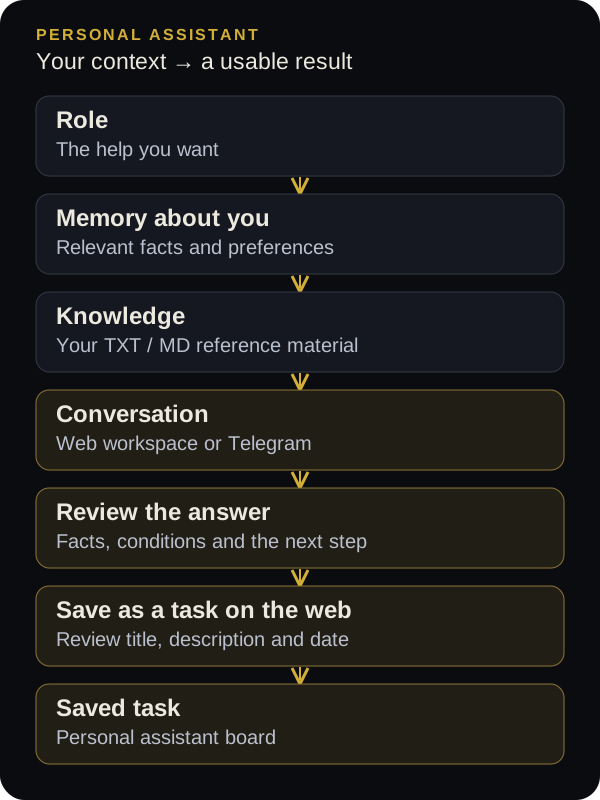
The central workflow connects clear context, a useful answer and a saved action. The assistant does not automatically gain access to all your documents, conversations and commitments: you supply its working material. When a price, working schedule or approval rule changes, update the relevant field. This makes it easier to understand what information should inform the answer and correct the source when needed. For a new user, a short, current brief is a better starting point than a large archive.
Who benefits from a personal AI assistant?
For a founder or small-business owner, it can help organize a work list, draft replies from service information and frame decisions. Supply a prospect's questions and ask it to separate confirmed facts, missing information and a proposed next step. The assistant prepares material for you to review. A personal bot does not automatically become a customer support service, and this distinction matters when you choose what to configure and whom to give access.
A freelancer can use it to prepare briefing questions, organize revision requests and draft calm replies. An expert can outline a consultation or explain a topic for a particular audience. A manager can turn their meeting notes into an agenda and decisions. Someone juggling personal projects can turn an untidy list into a sequence of steps. In every case, begin with one recurring responsibility. A narrow role gives you a clearer way to judge whether the assistant is helping.
Role, memory and knowledge: what goes where?
The three fields have different jobs. The role explains what help you want and how the answer should look. Memory holds stable facts about you: your work, language, preferences and constraints. Knowledge contains reference material such as a product description, service stages or a short operating guide. Keeping these separate makes updates easier and contradictions more visible. It also helps you decide whether an unsatisfactory answer came from an unclear instruction or an outdated fact.
| Field | Example content | Current limit |
|---|---|---|
| Role / task | Help plan the week; start with three priorities | 4,000 characters |
| Facts about me | I am a designer; I work weekdays; I prefer short lists | 6,000 characters |
| Knowledge | Services, confirmed terms, stages and FAQs | 16,000 characters |
Saved memory is not a promise to reproduce your entire life or every old message perfectly. Put facts needed for future answers in settings, or use /remember in the connected Telegram bot. After an important update, ask a control question such as “Which constraints in my working schedule should you take into account?” This checks the configuration on a simple example before you use it to prepare a real work plan. Keep the facts specific enough to verify.
How to create and configure your AI assistant: 8 steps
- 1. Open the personal assistantSign in to Cormak.app and choose the personal assistant from the menu or its card in Agents. The direct page is app.cormak.app/assistant.
- 2. Define one main roleOpen the memory settings. In the role field, describe the help you want, the output to prepare and the rules to follow. Adapt the template below to your situation.
- 3. Add stable facts about yourselfAdd your profession, audience, language, working constraints and preferred format. Include facts that are useful for the role you chose.
- 4. Prepare the knowledgePaste a short reference guide or upload TXT/MD. Check that its conditions are current and the text fits the limit, then save the web settings.
- 5. Run a test conversationAsk the assistant to restate its role and important constraints, then give it a small real request. Correct the context if an answer relies on a mistaken assumption.
- 6. Connect Telegram if usefulCreate a dedicated bot through @BotFather, paste its token into the connection card and open the one-time pairing link with your own Telegram account. Press Start.
- 7. Save a concrete actionIn the web workspace, use the task button below a suitable answer. Review its title, description and date, then create the task and find it in Tasks.
- 8. Keep the context currentUpdate memory and knowledge when prices, schedules or working rules change. Review several real conversations and refine the role using what you learn.
A ready-to-use personal AI assistant prompt
A useful role reads like a clear brief for a colleague: it includes a goal, boundaries and output format. “Be the best assistant at everything” says very little about your work. Start with the template below and replace the bracketed fields before putting it in the role setting. These are instructions for the model's behavior. They can guide its answers, but do not grant new access to services or guarantee error-free results.
You are my personal work assistant. I work in [field and role]. Help me with [two or three recurring responsibilities].
Use my saved memory and working knowledge. If essential facts are missing, ask up to three specific questions. Separate confirmed facts, my assumptions and your suggestions.
Reply in [language]. Start with the result, then a brief explanation and the next step. For a plan, state priorities and a clear completion criterion.
Do not invent prices, deadlines, reviews or agreements. Do not claim that a message was sent or an action completed when you have only prepared text. Show me client-facing material for review.
How to write useful memory
Save facts that change a decision. “I am busy” does little to improve a work plan, whereas “I have two hours each weekday for this project” gives it a real constraint. Replace “I like quality writing” with something observable: short paragraphs, a calm tone and the conclusion first. If you have several very different projects, name the relevant one in your current request. The assistant should not have to guess which project a new set of notes concerns.
My work: [profession or business].
People I serve: [audience].
Current main project: [name and goal].
Language: [language]. Tone: professional and approachable in client-facing drafts.
Available working time: [days and hours]. Time zone: [your zone].
Preferred answers: short paragraphs, starting with the three main points.
Important: I personally confirm deadlines and prices. Ask when a necessary fact is missing.
Avoid turning memory into an archive of every event. A compact profile is easier to inspect and update. Put one-off meeting details in a message and save a continuing approval rule in memory or knowledge. Also distinguish settings from conversation history: clearing a memory field does not erase earlier messages in which a fact appeared. After a change, inspect the relevant field and test a new answer rather than assuming all earlier references have disappeared.
How to add knowledge: TXT, Markdown and current rules
A small file describing your work is enough to begin. Include what you most often have to explain: your service, audience, process, briefing requirements and confirmed conditions. Divide it into clear sections and state when the information was last checked. If prices change, update the current reference and remove superseded figures from the knowledge field. Multiple conflicting price lists make an answer harder to assess even when the model has been told to use your files.
# Working knowledge
Last checked: [date]

## Product or service
[What I offer and whom it serves.]

## Confirmed conditions
[Price or quoting method, stages and limits. State explicitly when a condition is undecided.]

## Questions for a client
[Required briefing information.]

## Communication rules
[Tone and claims that require approval.]

## Decisions I make personally
[Matters that need my confirmation.]
This release supports TXT and MD text files up to 100 KB, with a combined knowledge limit of 16,000 characters. File size and text length are separate limits. In the web settings, an import adds its text to the existing contents, so review the combined result and save it. Prepare a PDF, spreadsheet or another document format as supported text first. Uploading a file supplies context; it does not train a new model or create an unlimited document repository.
How to connect your AI assistant to Telegram
The web workspace is useful for setup and reviewing long answers. Telegram helps when you want to ask a quick question from your phone or continue the conversation in a familiar messenger. Create a dedicated bot for this purpose. Avoid reusing the token of a customer-facing bot whose existing behavior you need to preserve: connecting the same bot to another message-processing system can affect how it works. A separate assistant bot keeps the setup easier to understand.
Open Telegram's official @BotFather, send /newbot and follow its prompts to choose the bot's name and username. Paste the token it provides into the Telegram connection card inside Cormak.app's personal assistant. Use the dedicated connection field. Do not put the token in an AI conversation, knowledge file or public screenshot. The service needs it to connect your bot, and it should be handled as a credential rather than ordinary working context.
Next, open the one-time link provided in the workspace using your own Telegram account and press Start. The link lasts 15 minutes; a new link replaces the previous pairing. This sequence matters: finding the bot by username and sending an ordinary /start is not enough to establish ownership. After pairing, send a short question and check that the assistant uses your saved settings. The Telegram conversation is also visible in the web workspace.
Telegram commands for role, memory and working material
| Command / action | Purpose | Example |
|---|---|---|
| /role text | Change the assistant's role | /role Help me prepare plans and draft replies |
| /remember text | Add a fact about the owner | /remember I do not schedule meetings on Fridays |
| /forget | Clear saved facts about the owner | Does not erase all history or knowledge |
| TXT/MD file | Add text to the knowledge | A short guide or service description |
| /help | View the instructions | Help with using the bot |
This feature is designed for a private conversation with the paired owner. Other users and groups do not gain access to that owner's personal context through the assistant. If you need a customer-facing bot or an agent that publishes to a channel, use the relevant separate workflow. A private working assistant and a public bot serve different purposes, so check the intended audience, access rules and actual actions before choosing a setup.
How to turn an answer into a task
A good answer does not by itself mean the work will happen. After a discussion, ask for one next action and a completion criterion. In the web workspace, use the task button beneath the answer, then review the title, description and date. Your long question may become the initial title and the full answer may become the description. Edit both so the task can be understood without rereading the entire conversation. Save it only after the wording and due date are right.
For example, “work on promotion” is difficult to complete or verify. “Prepare three prospect-message drafts using the approved service description” names a clear result. After saving, find the item on the personal assistant board in Tasks. Due-date reminders are inside the task area. Asking “remind me tomorrow in Telegram” does not activate timed delivery in this release. An answer that discusses a reminder is not evidence that an external notification has been scheduled.
From our discussion, propose one next task. Give it a short action title, a description of the result, a completion criterion and any missing information. I will choose its date in the form. Do not claim that the task has already been saved.7 everyday tasks to try first
Begin with material you can review quickly: your own to-do list, meeting notes or service description. The examples below are working templates, not claims that an assistant will automatically win clients or increase revenue. Replace bracketed fields, supply the source information and judge whether the answer moves a concrete piece of work forward. A useful first test has a result you can compare against your own knowledge of the situation.
Here is today's work: [list]. Available time: [amount]. Choose three main outcomes using my constraints. Explain their order, identify dependencies and suggest what to postpone. If everything will not fit, say so instead of creating an impossible schedule.The client wrote: [message with unnecessary personal details removed]. Draft a reply in my style using the service knowledge. Separately list issues that require my decision. Do not add a discount, exact price or deadline unless confirmed in the source information.These are my meeting notes: [text]. Extract decisions, open questions and possible next actions. Do not treat an option discussed as an approved decision. If an owner or deadline is missing, mark it as needing clarification.Using my audience description, propose five topics about [subject]. For each, state the reader's question, main point and an example supported by my material. Do not invent customer stories or reviews. Prepare ideas and an outline; I will publish separately.Here are the revision requests: [text]. Separate concrete changes, questions and possible scope expansion. Compare them with the supplied scope of work. Draft a calm response without accepting new conditions on my behalf.My idea is [description]. Goal: [outcome]. Constraints: [time and resources]. Identify three assumptions to test. Suggest one small experiment and a way to assess it. Separately list the facts we do not yet have.Here are this week's results and unfinished items: [list]. Compare them with my goal. Show progress, delays and three actions to prioritize next week. Do not add events that are absent from my notes.A working-day example: from a message to a usable result
Imagine a specialist building websites for small companies. Their saved memory describes their work and available time; the knowledge contains service stages and briefing questions. In the morning, they give the assistant four items: clarify a client's needs, review revisions, draft a service description and revisit an older idea. The assistant proposes an order and explains which information is needed before suggesting a deadline. The owner reviews that reasoning against their real commitments.
During the day, a client sends a message. The specialist asks through Telegram for a reply using the confirmed service conditions, reviews the draft and sends it themselves. In the evening, they open the conversation in the web workspace, select a next action and save it as a task. This is an illustrative workflow, not a measured customer case. Sending external messages, confirming agreements and deciding deadlines remain separate actions performed by the person.
Cormak.app compared with ChatGPT, Claude, Gemini and n8n
There is no single best AI assistant for every responsibility. Compare where you work, how context is supplied and what result you need. The following is an editorial comparison of workflows using official product information checked on October 27, 2026. It is not an independent model-quality benchmark or a claim that Cormak.app outperforms these products. Competitor features, availability and conditions can vary by account and change over time.
| Product | Useful scenario | What to consider |
|---|---|---|
| Cormak.app | Personal context, your own Telegram bot and saving a reviewed web answer as a task | Whether you need actions beyond conversation and manual task saving |
| ChatGPT | Project-based work with shared sources and instructions | Which tools and settings your account can use |
| Claude | Discussing reference material within projects | Knowledge organization and project memory settings |
| Gemini | Personalization using connected Google apps | Personal Intelligence eligibility and chosen connections |
| n8n | Agents and workflows with integrations, including Telegram | Workflow setup, permissions and execution checks |
Cormak.app or ChatGPT: consider your working environment
ChatGPT projects bring together chats, sources and shared instructions. Its official documentation also describes dot tasks and memory. It would therefore be inaccurate to claim that ChatGPT lacks personalization or support for ongoing work. If you already organize projects there, review the features available in your account. Cormak.app offers the workflow of defining personal context, chatting through your own paired Telegram bot and saving a chosen web answer to a task board.
Cormak.app or Claude: project knowledge and context
Claude supports project knowledge and instructions, and its help center also describes project memory. That is an option for organizing work around reference material inside Claude. Cormak.app's assistant uses separate role, personal-fact and knowledge fields, with stated TXT/MD limits. Consider the amount of material you need, the interface you prefer and how important Telegram is to your daily work when choosing between these workflows.
Cormak.app or Gemini: connected Google context or supplied material
Google describes Personal Intelligence in Gemini as personalization using chosen connections, history and preferences. Its listed sources include Gmail, Photos, Search and YouTube; check eligibility for your account and region. With Cormak.app's personal assistant, you supply working facts and text knowledge yourself. These are different ways of assembling context. Using a Gemini model inside Cormak.app does not automatically connect Gmail or other Google services.
Cormak.app or n8n: personal assistance and workflow automation
n8n provides agents, workflows, integrations and execution inspection, including Telegram connections. Its official page also describes creating agents from a text description, so calling it a product only for programmers would be misleading. Workflow behavior, permissions and outcomes still need configuration and verification. Explore that approach if you need actions across external systems. If your immediate need is personal conversation with saved context and task saving in Cormak.app, its ready-made assistant is a place to start.
How assistant credits are used
In this release, one Gemini Flash assistant answer uses one general Cormak.app AI credit. Editing the role or memory, importing knowledge, pairing Telegram and creating an ordinary task do not call the model and do not themselves use an AI credit. Your plan's Telegram bot limits still apply. Check your account and the pricing page for current access conditions and remaining credits before planning a larger volume of conversations.
A search for a free AI assistant can mean trial access, a free plan or unlimited replies. These are different conditions and need to be checked separately. An accessible assistant page does not establish unlimited usage. To evaluate the workflow, prepare a few requests: one to check context, one for a real draft and one to identify a next action. This gives you a practical result to assess without a long conversation repeating the same information.
Why an assistant gives generic answers: common setup mistakes
The first common problem is an overly broad role. If an assistant must simultaneously act as marketer, secretary, manager and writer for every situation, the desired depth and format become unclear. A second problem is conflicting knowledge, such as an old price beside a new one. A third is an unspecified outcome: “help with this client” is less actionable than “draft a reply and three questions to clarify the scope.” Fixing those inputs gives you a clearer test of the assistant's usefulness.
Another mistake is treating a sentence about execution as proof of execution. A conversational “I will remind you” or “the task is ready” does not replace an interface check. In Cormak.app, task creation completes through the form and the item should appear on the board. A client-facing draft likewise needs review and separate sending. The feature's actual capability limits still apply even when a model's answer sounds confident about an action.
What to check when Telegram or knowledge behaves unexpectedly
- The owner is not paired: return to the workspace, request a new link and pair your own account before its 15-minute expiry.
- You are writing in a group or from another account: use the paired owner's private conversation.
- A file is rejected: check its TXT/MD format, 100 KB size limit, valid text and the combined 16,000-character knowledge limit.
- A new fact is missing from an answer: check that the web settings were saved, then ask a specific control question.
- An answer is blocked by a limit: check your balance and the error message, then retry after resolving its cause.
- You expected a Telegram reminder: in this release, due-date reminders are inside Tasks; timed bot delivery is not included.
Personal context and information controls
Include the information needed for the task. A draft reply often requires only an anonymized message and your service rules. Keep tokens, passwords and other sign-in credentials out of knowledge and ordinary model conversations. Telegram pairing restricts this personal assistant to its owner, but does not mean AI processing happens entirely on your device. Answers use an external AI provider under the service's terms, so review those terms for the material you plan to supply.
Review saved memory and knowledge periodically: remove outdated facts, unnecessary details and conflicting rules. The /forget command clears saved owner facts, not every conversation or working material. Removing knowledge also does not erase earlier conversations. Understanding those distinctions makes the controls easier to use correctly. Before using an answer that contains important conditions, figures or promises, compare it with the source information rather than relying on fluent wording alone.
How to evaluate an assistant during the first week
Choose three recurring scenarios, such as sorting a work list, drafting client replies and reviewing meeting notes. Save a compact role and current context first. For each scenario, note the time spent preparing a request, checking the answer and correcting it. Also assess quality: were fewer conditions missed, was the next step clear and could you use the result without rewriting it completely? Those observations are more useful than the impression left by one striking answer.
If answers are too generic, refine the role and add a clear example of the format you expect. If only one scenario proves useful, keep the assistant focused on it. If the work requires actual email, calendar or other external-system actions, choose a solution with those confirmed capabilities. A personal AI assistant is especially relevant when you regularly work with text and decisions, want continuity of your own context and prefer to review a result before using it.
Where to start now
Open the Cormak.app personal assistant and choose one thing you already planned to do today. Define its role, add a few relevant facts and a short reference. Ask for a concrete result, review it and save the next action. If that workflow helps, connect Telegram and expand the range of scenarios gradually. This gives the assistant a clear responsibility and gives you your own evidence for whether it is worth using regularly.