
What you can do
Draft a customer reply
Select a question and ask your support agent to write a draft using your saved delivery and return policy.
Review a product listing
Share a listing excerpt with your marketplace agent to spot missing facts and improve the description.
Write a social post
Give your social media agent a product brief and ask for a draft tailored to your audience and channel.
Browser support
 Chrome
 Firefox
 Safari
 Opera
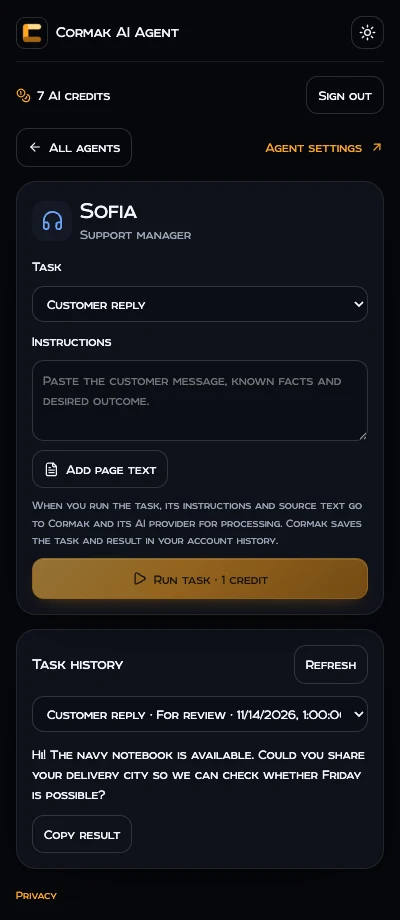
Chrome and Firefox have a popup and a sidebar. Opera uses its extension sidebar. Safari for Mac has a toolbar popup and a workspace tab.
Install after release
Store releases are pending.
- Open the official store listing for your browser when it appears here.
- Install the extension and open Cormak AI Agent from your browser toolbar. On Mac, first open the host app and enable it in Safari Settings → Extensions.
- Sign in with your Cormak email and password. Choose an agent you set up in Cormak and run a task.
Extension privacy
Your email and password are sent over HTTPS to Cormak’s authentication service. The browser stores the session locally so it can renew your access. The extension reads your Cormak agent list, credit balance and task history when you open the workspace.
Choose Add page text or select text and use Send to Cormak to prepare a draft on your device. When you run the task, Cormak processes the instructions and source text with its AI provider and stores them with the result in your account’s task history. The extension does not collect browsing history or continuously read tabs. Contact support@cormak.app for account and data requests.
Frequently asked questions
Do I need a Cormak account?
Yes. Sign in with the email and password for your existing account. If you use Google or Apple, use password reset in Cormak with the same email to set one.
What does a task cost?
A browser task uses one AI credit from your Cormak balance. Your current balance is shown in the extension.
When is page text sent?
You can edit or remove the text in the draft. It is sent when you choose Run task.
Where do drafts go?
Results appear in the task history for the agent. Review them before you send or publish them.