
Cormak is not yet published in the Zoom App Marketplace. The Marketplace link will appear here after Zoom approves the app.
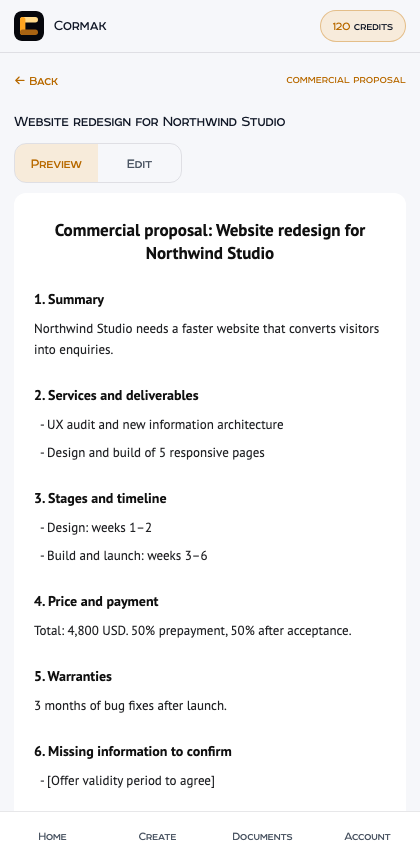
What you can do in a meeting
- Commercial proposal: services, stages, price, payment terms and warranties from the terms you agree on the call.
- Statement of work, estimate, project plan and partnership proposal.
- Meeting report with agreed points and action items.
- Contract drafts from the Cormak legal cabinet: service agreement, work contract, NDA, cooperation agreement, supplementary agreement and other types, with country and governing law.
- Ask AI to change the document, edit it yourself, save it to your Cormak account and download PDF or DOCX.
How to connect
- Install Cormak from the Zoom App Marketplace (the link appears above after publication).
- In a Zoom meeting, open Apps and select Cormak.
- Select Sign in with Cormak. Your browser opens app.cormak.app; sign in or create a free account and enter the code shown in Zoom.
- Return to Zoom. The panel shows your balance and you can create documents.
Sign-in and permissions
Zoom and Cormak accounts stay separate. You sign in only on app.cormak.app; Cormak never sees your Zoom password and Zoom never receives your Cormak password.
Cormak asks Zoom for the minimum needed to show an in-meeting panel. It does not access your camera, microphone, recordings, transcripts, chat or participant list, and it does not record meetings.
A Cormak session in Zoom is bound to your Zoom user and expires after 30 days. You can sign out in the panel or disconnect all Zoom sessions on app.cormak.app/integrations/zoom.
Credits and pricing
The app is free to install. Each generated document or AI revision uses 5 credits from your existing Cormak balance; the price is shown on the button before you start. Manual edits, saving, downloading and deleting are free.
If generation fails, the reserved credits are returned automatically. Repeating the same request after a connection problem does not charge twice.
Buy credits opens your Cormak billing page in the browser. Plans and prices are the same as on cormak.app/pricing.
About contract drafts
Contract drafts are created by the Cormak legal cabinet. They are AI-generated working drafts, not documents reviewed by a lawyer. Cormak does not invent party details, dates, prices or legal citations: missing terms stay as [placeholders] and are listed for you to check.
Cormak has no live legal database. Review every clause, confirm current law in your country and have important documents checked by a qualified professional before signing.
Your data
The terms you type and the documents you create are processed by Cormak and sent to an AI model through OpenRouter only when you select Generate or Apply. Documents are stored in your Cormak account until you delete them or delete your account.
Cormak does not use meeting participants' data for advertising. See the Privacy Policy for the full list of processors.
Remove the app
In Zoom, open the Zoom App Marketplace, select Manage → Added Apps, and remove Cormak. Removing the app ends all Cormak sessions of your Zoom user and deletes pending sign-in codes. Your documents stay in your Cormak account; you can delete them at app.cormak.app/integrations/zoom or delete your Cormak account in Settings.
Support
Write to support@cormak.app. Include the time of the problem and the document type; do not send passwords or full contract texts by email.